
RCS Messaging Platform for Next-Generation Customer Communication
Transform traditional text messaging into rich, interactive and engaging customer experiences with our powerful RCS Messaging Platform.
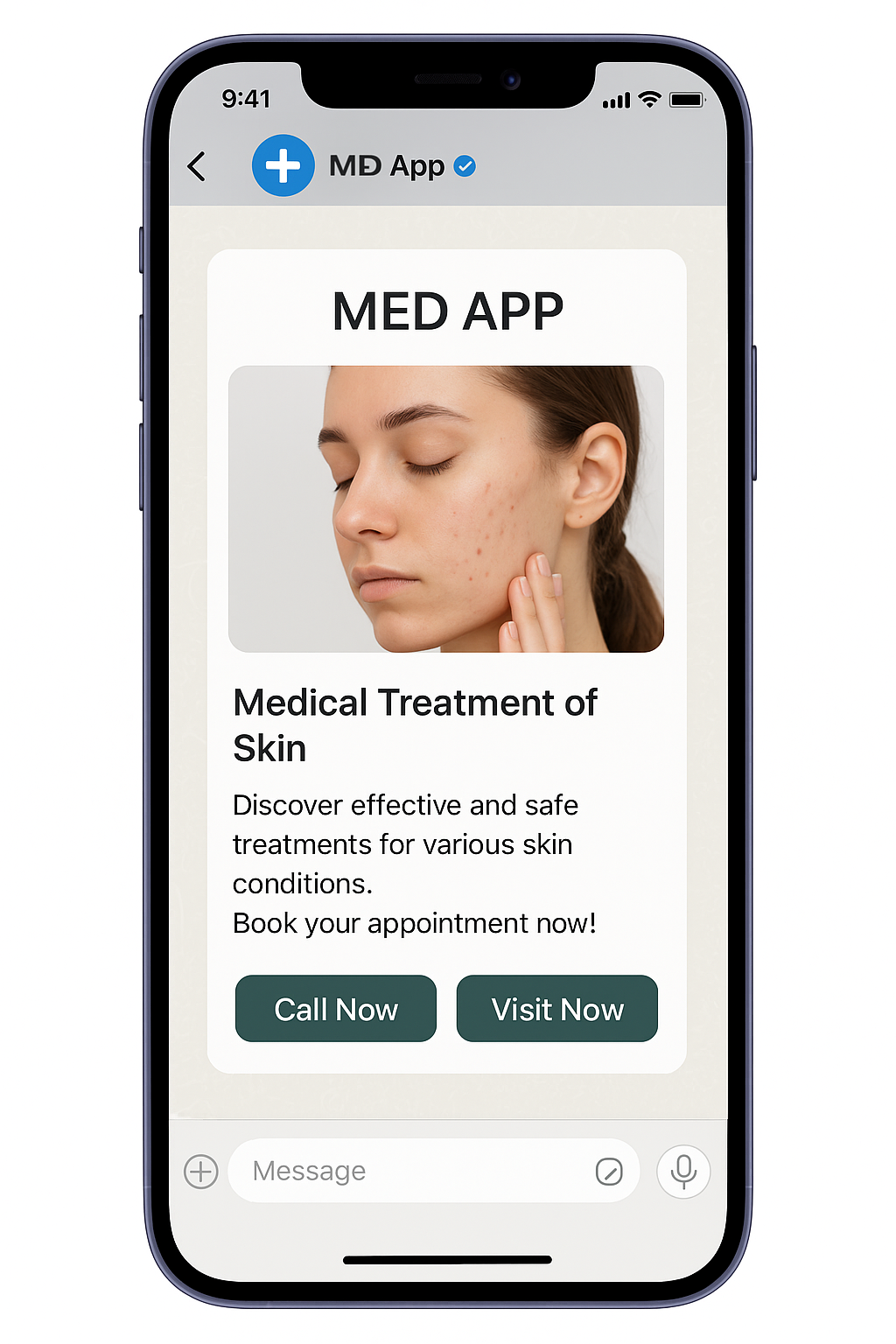
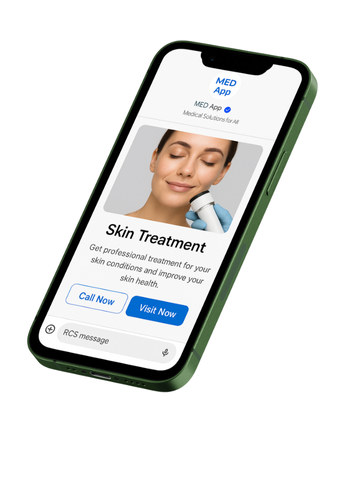
RCS for Business enables brands to communicate with customers using images, videos, rich cards, carousels, suggested replies, action buttons, branded sender profiles and two-way conversations directly within supported messaging experiences.
From marketing campaigns and product promotions to order updates, OTP, appointment reminders and customer support, our RCS Business Messaging Platform helps businesses create personalized conversations that go beyond traditional SMS.
Connect. Communicate. Captivate.
What is RCS Messaging?
RCS stands for Rich Communication Services.
RCS is a modern messaging standard that adds rich media, interactivity and business-focused capabilities to messaging compared with traditional SMS/MMS.
Instead of sending customers a simple text message such as:
“Your order has been shipped.”
Businesses can create a richer experience with:
- Product images
- Brand logo
- Order details
- Tracking button
- Suggested replies
- Call-to-action buttons
- Rich cards
- Carousels
- Web experiences
- Two-way conversations
This makes RCS a powerful channel for marketing, sales, customer engagement, authentication and support.
What is an RCS Business Messaging Platform?
An RCS Business Messaging Platform enables businesses to create, send, receive and manage rich business messages through supported RCS infrastructure.
Businesses can connect their:
- Website
- Mobile application
- CRM
- ERP
- E-commerce platform
- Customer support system
- Marketing automation platform
with an RCS platform through APIs and integrations.
Google describes RCS for Business as a channel for branded, interactive customer communication, including rich media, verified branding, user-initiated conversations and analytics.
RCS Messaging Services
1. RCS Marketing Messages
Create visually engaging promotional campaigns using rich media.
Use RCS Marketing for:
- Product launches
- Sales campaigns
- Discounts
- Seasonal offers
- New collections
- Brand promotions
- Loyalty campaigns
- Flash sales
- Event promotions
- Lead generation
Example
Summer Sale – Up to 50% OFF
[Product Image]
Discover our latest collection.
Shop Now | View Products | Talk to Us
Instead of sending only text, RCS can combine visual content with interactive actions.
2. RCS Promotional Campaigns
Build interactive promotional campaigns with:
- Images
- Videos
- GIFs
- Rich cards
- Product carousels
- Suggested replies
- CTA buttons
- Web views
RCS for Business supports rich cards and carousels that combine media, text and suggested replies/actions.
Example
New Smartphone Collection
📱 Product Image
Starting at ₹19,999
[View Details]
[Buy Now]
[Talk to Expert]
This allows customers to interact directly with the message.
3. RCS Transactional Messaging
Keep customers informed throughout their journey.
Use RCS for:
- Order confirmation
- Payment confirmation
- Shipping updates
- Delivery tracking
- Booking confirmation
- Invoice notifications
- Subscription updates
- Account notifications
- Service updates
Example
Order Confirmed
Hello Amit,
Your order #TX45821 has been confirmed.
Amount: ₹2,499
Expected Delivery: 28 September
[Track Order]
[View Order]
4. RCS OTP & Authentication
Use RCS for authentication and verification workflows where supported.
Applications include:
- Login OTP
- Registration verification
- Mobile verification
- Password reset
- Transaction authentication
- Security alerts
- Fraud notifications
Google lists authentication, including one-time passwords and fraud alerts, among RCS for Business use cases.
Example
Verify Your Account
Your verification code is:
582941
[Copy OTP]
This creates a more branded authentication experience than a plain text message.
5. RCS Customer Support
Turn messaging into a two-way customer service channel.
Customers can interact with your business using:
- Suggested replies
- Buttons
- Rich media
- FAQs
- Product information
- Booking options
- Support links
- Human-agent handover
- Conversational bots
RCS for Business supports user-initiated conversations and interactive customer engagement.
Example
How can we help you?
[Track My Order]
[Product Support]
[Book Appointment]
[Talk to Support]
6. RCS Conversational Messaging
RCS enables businesses to move from one-way messaging to two-way conversations.
A customer can:
Receive Message → Select Option → Get Information → Take Action → Complete Journey
For example:
Customer:
I want to book an appointment.
Business:
Choose a preferred date.
[Monday]
[Tuesday]
[Wednesday]
Customer selects Tuesday.
Business:
Choose your preferred time.
[10 AM]
[12 PM]
[4 PM]
This creates a conversational customer journey directly inside the messaging experience.
7. RCS Rich Cards
Rich Cards combine:
- Image
- Title
- Description
- CTA
- Suggested action
- Suggested reply
Example
Premium Hotel Room
[Hotel Image]
Luxury room with breakfast included.
₹5,999 / Night
[Book Now]
[View Details]
Rich cards make product and service communication more visual and actionable.
8. RCS Carousel Messaging
Show multiple products or services in a horizontally scrollable carousel.
Example
Explore Our Latest Collection
Product 1
₹1,999
[Buy Now]
Product 2
₹2,499
[Buy Now]
Product 3
₹3,999
[Buy Now]
Carousels can help businesses showcase multiple products or services within a single conversation.
9. RCS Suggested Replies & Actions
Reduce customer effort with predefined actions.
Examples:
Suggested Replies
- Yes
- No
- More Details
- Talk to Expert
- Track Order
Suggested Actions
- Open Website
- Call Business
- View Location
- Add to Calendar
- Start Journey
These interactive options can help guide customers toward the next step.
10. RCS Web View
RCS can connect customers to web experiences from within the messaging journey.
Use Web View experiences for:
- Product catalogues
- Booking
- Registration
- Forms
- Product details
- Checkout
- Customer service
- Order tracking
This can reduce friction between receiving a message and taking action. Google specifically highlights web-view experiences for browsing products, viewing carts and completing journeys.
11. Branded RCS Business Profile
Build recognition with a branded business messaging experience.
Depending on launch and carrier support, businesses can use:
- Business name
- Logo
- Brand colours
- Business description
- Verified sender information
Google’s RCS for Business documentation says brand verification is required before an agent’s first launch, with verification confirming the brand representative and authorization to manage the agent.
12. RCS SMS Fallback
Customer reach is important.
Where supported, RCS platforms can provide SMS/MMS fallback when an RCS message cannot be delivered, helping businesses maintain communication reach.
Example Journey
RCS Available
↓
Rich RCS Message
↓
Customer interacts with brand
OR
RCS Unavailable
↓
SMS Fallback
↓
Customer receives the message
Actual fallback behaviour and availability can depend on the provider, carrier, device and market.
RCS SMS API
Integrate RCS messaging directly into your existing applications with an RCS API.
API Integration Use Cases
- OTP
- Order confirmation
- Payment alerts
- Booking notifications
- Promotional campaigns
- Customer support
- Product recommendations
- Delivery tracking
- Appointment reminders
Typical Architecture
Website / App / CRM
↓
RCS API
↓
RCS Business Messaging Platform
↓
Carrier / Messaging Infrastructure
↓
Customer
RCS API Features
Our RCS API can be designed to support:
- Message sending
- Rich media
- Rich cards
- Carousels
- Suggested replies
- Suggested actions
- Template/content management
- Delivery events
- Read events
- User responses
- Webhooks
- Campaign management
- Analytics
- SMS fallback
Google’s developer documentation provides delivery and read events as well as interaction events that can be received through webhooks.
RCS Campaign Management Platform
Manage your complete RCS campaigns from a centralized dashboard.
Campaign Creation
- Campaign Name
- Select RCS Agent
- Select Audience
- Select Message
- Add Rich Media
- Add CTA
- Add Suggested Replies
- Preview Campaign
- Schedule Campaign
- Send Campaign
Campaign Reports
Track:
- Messages Sent
- Delivered
- Read
- Clicks
- Replies
- Actions
- Unsubscribes
- Campaign Engagement
RCS for Business supports analytics such as clicks, taps, read receipts and replies, depending on the implementation.
RCS Dashboard
A complete RCS platform dashboard can include:
Dashboard
- Total Campaigns
- Messages Sent
- Delivered
- Read
- Clicks
- Replies
- Engagement Rate
Campaign Management
- Create Campaign
- Schedule Campaign
- Campaign History
- Draft Campaigns
- Templates
Audience Management
- Contacts
- Customer Segments
- Lists
- Tags
- Opt-out Management
Content Management
- Rich Cards
- Carousels
- Images
- Videos
- GIFs
- Buttons
- Suggested Replies
Reports
- Delivery Report
- Read Report
- Click Report
- Engagement Report
- Campaign Analytics
RCS for E-Commerce
Create richer shopping experiences.
Use Cases
- Product discovery
- New product launches
- Cart reminders
- Order confirmation
- Payment confirmation
- Shipping updates
- Delivery tracking
- Product recommendations
- Promotional offers
- Customer support
Example
Your Cart is Waiting
You left these products in your cart.
[Product Image]
₹2,999
[Complete Purchase]
[View Cart]
RCS for Banking & Financial Services
Use RCS for customer communication such as:
- Transaction notifications
- Payment alerts
- Account information
- Security alerts
- OTP
- Fraud notifications
- Customer support
Authentication and fraud-alert use cases are among the RCS for Business categories described by Google.
RCS for Healthcare
Hospitals, clinics and healthcare businesses can use RCS for:
- Appointment booking
- Appointment reminders
- Doctor information
- Hospital directions
- Test/report notifications
- Follow-up reminders
- Health service promotions
- Customer support
Example
Appointment Confirmed
Your appointment with Dr. Sharma is confirmed.
Date: 30 September
Time: 5:30 PM
[Get Directions]
[Reschedule]
[Call Hospital]
RCS for Hotels & Hospitality
Use RCS throughout the guest journey.
Before Booking
- Offers
- Room information
- Packages
- Availability
After Booking
- Booking confirmation
- Check-in information
- Directions
- Guest support
During Stay
- Room service
- Restaurant booking
- Hotel services
- Support
After Stay
- Feedback
- Loyalty
- Offers
- Repeat booking
RCS for Real Estate
Real estate companies can use RCS to showcase properties visually.
Example
Premium 3 BHK Apartment
📍 Jaipur
₹85 Lakh onwards
[View Property]
[Book Site Visit]
[Talk to Sales]
RCS can combine property images, descriptions and interactive actions within the messaging journey.
RCS for Education
Use RCS for:
- Admission campaigns
- Course promotions
- Application updates
- Exam notifications
- Fee reminders
- Counselling appointments
- Student support
- Webinar invitations
RCS for Travel & Tourism
Use RCS for:
- Travel offers
- Booking confirmations
- Ticket information
- Hotel bookings
- Travel reminders
- Itinerary updates
- Destination promotions
- Customer support
RCS for Automotive
Automobile companies and dealerships can use RCS for:
- New vehicle launches
- Test-drive booking
- Service reminders
- Offers
- Vehicle information
- Service status
- Dealership communication
Example
Book Your Test Drive
Explore the new SUV.
[View Vehicle]
[Book Test Drive]
[Find Dealer]
RCS for Logistics & Delivery
Use RCS to provide customers with real-time delivery communication.
Example
Your Order is Out for Delivery
Order: #45821
Expected delivery: Today
[Track Order]
[Contact Delivery]
RCS vs SMS
| Feature | SMS | RCS |
|---|---|---|
| Plain Text | Yes | Yes |
| Images | Limited/Not native | Yes |
| Videos | No | Yes |
| Rich Cards | No | Yes |
| Carousels | No | Yes |
| Suggested Replies | No | Yes |
| CTA Buttons | Limited | Yes |
| Branding | Limited | Rich branded profile |
| Two-Way Conversation | Limited | Yes |
| Read Receipts | Limited | Supported |
| Typing Indicators | No | Supported |
| Web Experience | Link-based | Rich web-view capability |
| Analytics | Basic | Advanced capabilities |
| SMS Fallback | Native SMS | Available through supported implementations |
RCS capabilities and availability depend on device, carrier, market and implementation.
RCS vs WhatsApp Business
RCS and WhatsApp are different messaging channels.
RCS
- Native messaging experience
- Rich media
- Branded business identity
- Rich cards
- Carousels
- Suggested replies
- Business conversations
- SMS fallback where supported
- WhatsApp application
- Rich media
- Business profiles
- Conversational messaging
- Templates
- Chat-based customer journeys
For businesses, an omnichannel strategy can combine RCS, SMS, WhatsApp and other communication channels according to customer reach, use case and business requirements.
RCS Omnichannel Messaging
Don’t depend on a single communication channel.
Connect:
RCS + SMS + WhatsApp + Voice + Email + Social Channels
Create one connected customer journey across multiple channels.
Example
Customer Lead
↓
RCS Product Message
↓
Customer Clicks
↓
WhatsApp Conversation
↓
Sales Team
↓
Voice Call
↓
Purchase
This approach can help businesses coordinate marketing, sales and customer support across channels.
RCS Analytics & Reporting
Measure customer interaction beyond simple delivery.
Track metrics such as:
- Sent
- Delivered
- Read
- Clicked
- Replied
- Button Actions
- Suggested Reply Actions
- Unsubscribes
- Engagement
- Conversion Events
RCS platforms can expose richer engagement signals than traditional SMS, including read and interaction events.
RCS AI & Automation
RCS can also be integrated with AI-powered conversational experiences.
AI Use Cases
- AI customer support
- Product recommendations
- Automated FAQs
- Lead qualification
- Appointment booking
- Order tracking
- Conversational commerce
- Customer service automation
Example
Customer:
I want a red shirt under ₹2,000.
AI Assistant:
Here are three options:
[Product 1]
[Product 2]
[Product 3]
Customer:
Show me Product 2.
AI Assistant:
Here are the details.
[Buy Now]
This turns messaging into a conversational sales channel.
How RCS Messaging Works
Step 1 – Create Business Profile
Set up your business/brand information and RCS agent.
Step 2 – Brand Verification
Complete the applicable verification process.
Google states that brand verification is a prerequisite before an agent’s first launch.
Step 3 – Agent Launch
Submit the RCS agent for launch with the required information.
Step 4 – Connect API
Integrate your CRM, website, application or software with the RCS API.
Step 5 – Create Message
Design your RCS message using:
- Text
- Images
- Video
- Rich Cards
- Carousel
- Buttons
- Suggested Replies
Step 6 – Send Campaign
Send messages to your selected audience.
Step 7 – Customer Interaction
Customers can read, click, reply and interact with available actions.
Step 8 – Track Analytics
Monitor delivery, reads and interactions.
Launch requirements can vary by carrier and market, so the exact onboarding process should be confirmed with the RCS provider/aggregator serving your target market.
Why Choose Our RCS Messaging Platform?
Rich Customer Experiences
Move beyond plain text with images, videos, cards and interactive actions.
Powerful APIs
Connect RCS with your website, CRM, ERP and mobile applications.
Branded Communication
Present customers with a recognizable business identity where supported.
Two-Way Conversations
Allow customers to interact directly with your business.
Smart Automation
Automate marketing, transactional and customer-support journeys.
Detailed Analytics
Measure delivery, reads, clicks and customer interactions.
Omnichannel Integration
Connect RCS with SMS, WhatsApp, Voice and other business communication channels.
Scalable Communication
Build messaging journeys for startups, SMBs and enterprise businesses.
RCS Messaging Platform Benefits
Increase Customer Engagement
Rich media and interactive messaging can create more engaging experiences than plain SMS.
Strengthen Brand Identity
Use branded business profiles and visual content to make communication recognizable.
Simplify Customer Journeys
Give customers direct actions instead of asking them to manually type or search.
Create Two-Way Conversations
Turn business notifications into interactive conversations.
Improve Customer Experience
Deliver useful information and actions within the messaging journey.
Connect Marketing & Commerce
Move customers from promotion to product discovery and action within a connected experience.
RCS Messaging Platform for Enterprises
Our RCS platform can support enterprise communication requirements including:
- High-volume messaging
- API integration
- CRM integration
- Campaign management
- Multiple users
- Multiple brands
- Customer segmentation
- Analytics
- Webhooks
- Automated journeys
- Omnichannel communication
RCS Messaging Platform for Agencies
Digital marketing agencies can use RCS to offer clients:
- RCS Campaign Management
- Promotional Campaigns
- Lead Generation
- Customer Engagement
- Rich Media Messaging
- Transactional Messaging
- API Integration
- Campaign Analytics
Agencies can manage multiple client accounts and campaigns from a centralized platform, subject to the provider’s account and agent architecture.
RCS Messaging Platform – Key Features
Messaging
- Text Messages
- Images
- Videos
- GIFs
- Audio
- PDFs
- Rich Cards
- Carousels
Interactive Features
- Suggested Replies
- Suggested Actions
- CTA Buttons
- Call Action
- Location Action
- URL Action
- Calendar Action
- Web View
Business Features
- Branded Profile
- Business Verification
- RCS Agent
- Customer Conversations
- User-Initiated Messaging
API Features
- REST API
- Webhooks
- Delivery Events
- Read Events
- Interaction Events
- CRM Integration
- ERP Integration
Analytics
- Delivery
- Read
- Click
- Reply
- Engagement
- Campaign Performance
RCS Messaging Platform FAQ
What is RCS?
RCS means Rich Communication Services, a modern messaging standard that provides richer and more interactive messaging capabilities than traditional SMS/MMS.
What is RCS Business Messaging?
RCS for Business is designed specifically for businesses to communicate with customers using branded and interactive messaging experiences.
Can RCS send images and videos?
Yes. RCS for Business supports rich media including images, videos, GIFs and other supported content types.
Can RCS send carousels?
Yes. RCS supports carousel experiences that allow businesses to present multiple products or pieces of content within a conversation.
Can customers reply to RCS messages?
Yes. RCS for Business supports two-way conversations and user-initiated interactions.
Does RCS support OTP?
Yes. Authentication and one-time-password messaging are among the supported RCS for Business use cases.
Can RCS be integrated with CRM?
Yes. RCS can be integrated with CRM, e-commerce and other business applications through available APIs and integrations.
Does RCS provide delivery reports?
Yes. RCS implementations can provide delivery and read events, along with interaction events.
Is RCS available in India?
RCS for Business is available in supported markets and carrier environments, including India through supported RCS partners and infrastructure. Availability can vary by carrier, device and implementation.
What happens if RCS is unavailable?
Supported RCS implementations can use SMS/MMS fallback where configured and available. Exact fallback behaviour depends on the provider and market.
Is RCS better than SMS?
RCS and SMS serve different communication requirements. RCS provides substantially richer interactive capabilities, while SMS offers broad compatibility. Businesses can use both together as part of an omnichannel messaging strategy.
RCS Messaging
- RCS Messaging Platform
- RCS Business Messaging
- RCS Messaging Service
- RCS SMS Platform
- RCS SMS Service
- RCS Business Messaging Platform
- RCS Messaging Provider
- RCS Platform India
- RCS Messaging India
- RCS Business Messaging India
- RCS API
- RCS API Provider
- RCS SMS API
- RCS Business API
- Rich Communication Services
- Rich Messaging Platform
- Rich Media Messaging
- Interactive Messaging
- Business Messaging Platform
- Enterprise Messaging Platform
- RCS Marketing
- RCS Marketing Platform
- RCS Campaign Platform
- RCS Chatbot
- RCS Customer Engagement
- RCS Conversational Messaging
- Best RCS messaging platform in India
- RCS business messaging provider in India
- RCS SMS service provider India
- RCS API provider India
- RCS business messaging API
- RCS rich media messaging platform
- RCS marketing platform for businesses
- RCS messaging solution for enterprises
- RCS messaging platform for e-commerce
- RCS messaging platform for hospitals
- RCS messaging platform for real estate
- RCS messaging platform for hotels
- RCS messaging platform for banks
- RCS messaging platform for education
- RCS SMS API integration
- RCS business messaging software
- RCS customer engagement platform
- RCS conversational messaging platform
- RCS rich card messaging
- RCS carousel messaging platform
RCS Messaging Platform & RCS SMS API Provider in India | Business Messaging
Powerful RCS Messaging Platform for businesses. Send rich media, images, videos, carousels, rich cards, OTP, transactional and promotional messages with RCS API and analytics.
RCS Messaging Platform for Rich & Interactive Business Communication
Suggested Website Page Structure
For SEO, I recommend making the RCS page structure:
H1 – RCS Messaging Platform
↓
Introduction
↓
What is RCS?
↓
RCS Business Messaging
↓
RCS Features
- Rich Cards
- Carousel
- Images
- Videos
- Suggested Replies
- CTA Buttons
- Web View
- Verified Branding
↓
RCS Services
- Marketing
- Transactional
- OTP
- Customer Support
- Conversational Messaging
↓
RCS API
↓
RCS Dashboard
↓
RCS Analytics
↓
Industry Solutions
- E-commerce
- Banking
- Healthcare
- Hospitality
- Real Estate
- Education
- Travel
- Automotive
- Logistics
↓
RCS vs SMS
↓
RCS vs WhatsApp
↓
How RCS Works
↓
Benefits
↓
FAQ
↓
CTA
Start Your RCS Business Messaging Journey
Make every customer interaction richer, smarter and more interactive with RCS Business Messaging.
RCS Messaging | RCS API | Rich Media | Rich Cards | Carousels | OTP | Transactional | Promotional | Customer Support
Connect. Communicate. Captivate.